- Published on
C++ Arays From Basic
- Authors

- Name
- Saqib Tanveer
C++ Arrays:
In C++ arrays are nothing but a way to store data. But anyone can say that we already have variables for storing data then why arrays. The answer of this question is in another question that how array are different from variables.
consider the two example below :
int value = 0;
int values[5] = {1, 56, 10, 9, 8};
In the two code blogs we can see that in first code blog we are storing the integer 0 to the variable whose name is value and type is int(integer).
But in the second code blog we see that we are storing a series of integers to a variable whose name is values, type is int(integer) and the size of data can be store in it is 5. So by combining the name and size we get a syntax like int values[5].
Defination:
Now lets see its defination.
In C++, an array is a data structure that is used to store multiple values of similar data types in a contiguous memory location.
see the following image: 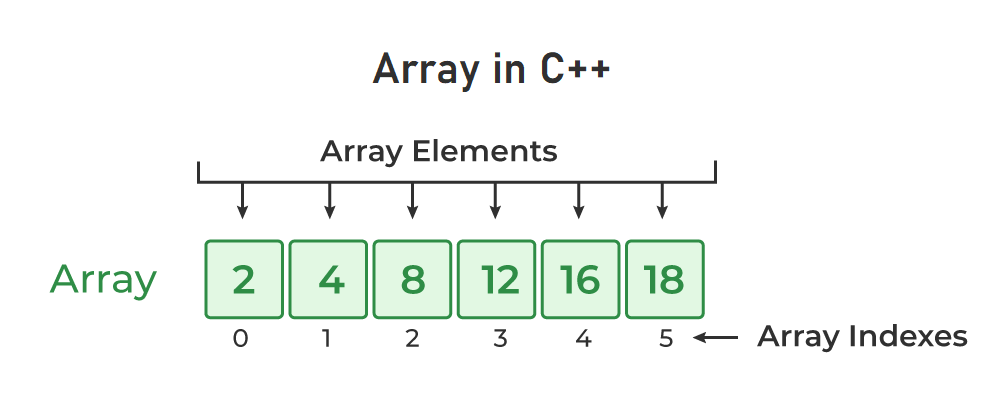
lets explore some more about arrays by using the above image.
Specific data type array can store only that type of data. Means that array of type int can't store the data of type char.
Array store data in a contiguous memory location.
Array store data and manage them by indexes. Mean that in the image you can say that there is the data 2 at the index 0.
Each data separated by comma in array is called element of array.
Index start from 0.
Element of array can be accessed by using index like
int A[5] = {1, 2, 3, 4, 5};

cout << A[0];
the cout will print 1 as there is 1 on the 0 index of array A.
Printing the whole array
Now we know that we can access an element of array by A[index]. And we also know that we can print the element by using cout like below:
cout << Array[index]; // index can be 0, 1, 2, 3 etc
Now what about printing the whole array as the above code just print the one element of an array.
A bad approch we can use is below :
cout << A[0] << endl;
cout << A[1] << endl;
cout << A[2] << endl;
cout << A[3] << endl;
cout << A[4] << endl;
the above code print the first five elements of array but thing if we have 100 or 200 elements in an Array. What we will do. Its clear that we will not print that 100 elements by the above approch.
An easy way to print whole array is as follow by using for loop:
int Arr[5] = {1,2,3,4,5};

for(int i=0; i<5; i++){
cout << A[i] << endl;
}
The above code will print the whole array. I hope you got it. See how we convert the hundred lines of code to two line of code.
Two Dimensional Array
Array of arrays is called two dimensional array. See the below code.
int A[5] = {1, 2, 3, 4, 5};

int B[3][2] = {
{1, 2},
{3, 4},
{5, 6}
};
In the above code we make one dimensional and two dimensional arrays. If use absorve that in second array we just put an array instead of a element. Mean in one array where we enter element like 1, 2 in second array on the place of 1, 2 etc we entered the arrays like {1, 2}, {3, 4}. How simple is that.
Two Dimensional Arrays Are Matrices Like In Maths
See the following array and absorve the rows and columns as like in matrix.
int Array[3][3] = {
{1, 2, 3},
{4, 5, 6},
{7, 8, 9}
};
You can easily absorve the the 3 row and 3 columns on the above array.
Printing Two Dimensional Array.
As we can print the on dimensional array with only using one for loop. Just like we can print two dimensional array by using two for loops.
//intializing array
int A[3][3] = {
{1, 2, 3},
{1, 2, 3},
{1, 2, 3}
};

// displaying the array
for(int i = 0; i < 3; i++){
cout << "| ";
for(int j = 0; j < 3; j++){
cout << setw(4) << A[i][j] << setw(4);
};
cout << " |" << endl;
};
In the above example we can see that we used two loop with i and j. In A[i][j] i represents the row index and j represents the column. And we are getting the array elements like A[0][0], A[0][1], A[0][2], A[1][0], A[1][1] . . . .
For using setw() you have to set
iomanipheader file.
I hope you got that how can we work with two dimensional arrays.
Lets Talk About Add/Sub On Two Dim Arrays (Matices)
We can easily add and subtract the matrices means two dimensional array(both are same in comp sci) by using for loop. Consider the following code:
int A[3][3] = {
{1, 2, 3},
{1, 2, 3},
{1, 2, 3}
};
int B[3][3] = {
{1, 2, 3},
{1, 2, 3},
{1, 2, 3}
};

// Adding
for(int i = 0; i < 3; i++){
for(int j = 0; j < 3; j++){
A[i][j] += B[i][j];
cout << A[i][j];
};
};
In the above code we are just adding every element of B into corresponding element of A. When we do A[i][j] += B[i][j] its mean that add the element B into element of A. Let me to explain more clearly. If i = 0 an j=0 then A[i][j] and B[i][j] will be 1 an 1. and the code line A[i][j] = A[i][j] + B[i][j] will result in 1 + 1 = 2. Thats it.
Whats Now :
This blog was getting you to the basic understanding of Arrays in C++. You Can explore more on array by browsing interne.
some sources are :